
Inventory Management Explained: A Complete Guide for Modern Businesses
Key Takeaways
Inventory management is a day-to-day balancing act between product availability and cash flow. You control what you stock, where it sits, and when you reorder so customers can buy without tying up money in slow-moving items
The right mix of methods, metrics, and tools reduces three expensive problems: stockouts, overstock, and manual errors. When your process is clear, a buyer can spot risk in minutes, a warehouse lead can prioritize picks faster, and finance can trust the numbers
A simple audit-to-automation roadmap lets you improve accuracy and service levels within weeks. If you do one thing first, audit your top sellers and your worst offenders so you know exactly where to tighten counts and reorder rules
Inventory management balances availability and cash by controlling what you stock, where, and when
Methods, metrics, and tools help cut stockouts, overstock, and costly manual mistakes
An audit-to-automation plan can improve accuracy and service levels within weeks
Your shelves are full but orders still can’t ship
You check the system and it says you have 28 units on hand, so you promise a two-day ship time. Then the picker walks the aisle for 12 minutes, checks two overflow locations, and comes back empty handed. The order sits in limbo, customer support starts getting messages, and your team wastes labor on a scavenger hunt.
This is what it looks like when you have inventory on paper but not in the right place, not labeled correctly, or not recorded correctly. Many operations aim for 95–99% inventory record accuracy, because below that range you end up buffering with extra stock, extra labor, or both. The goal in this section is simple: make the system match the shelf so pickers can find what customers already paid for.
Common ways this shows up day to day:
The item is in the building but stored in the wrong bin because a putaway was rushed
The SKU exists in two locations, but only one is recorded, so the picker goes to the wrong one
Returns were placed back on shelves without being received back into inventory
A substitution was made during picking, but the inventory adjustment was never logged
Similar items share a description, so the picker grabs the wrong variant (size, color, revision)
If you do one thing first, fix location discipline before you buy more stock. A warehouse with 10,000 units where 1 in 20 records is wrong creates more late shipments than a smaller warehouse where every unit is findable. Works best when every product has a default pick location and overflow is clearly marked; fails when teams treat overflow as a free-for-all.
A quick, practical reset you can run in a single shift:
Pick 20 fast-moving SKUs and physically verify their primary bin counts
Correct the count in the system immediately and note the likely cause (putaway, returns, damage, mis-pick)
Add or replace labels so the bin and SKU are unambiguous from 2–3 meters away
Lock in a basic rule: no product moves without a scan or a written move ticket
A common mistake is running a full warehouse count first. The fix is to start with the SKUs that create the most customer pain: top sellers, backorders, and items with frequent substitutions. Once those are stable, you can expand the same controls to the rest of the catalog.
Why inventory management is harder than it looks
Also, inventory management is not just counting items on a shelf. It includes forecasting demand, purchasing, storage, tracking, replenishment, and fulfillment, which means one weak link can block the whole flow from supplier to customer.
For example, a buyer can place the right order, but if the receiving team cannot match cartons to purchase orders, stock sits in a corner as “unknown.” Or a fulfillment associate sees stock in the system, but it is in the wrong bin, so orders get split, delayed, or cancelled.
But most failures are not dramatic, they are small gaps repeated every day:
Scattered spreadsheets that disagree with the inventory system and each other
Inconsistent SKUs, where the same item is listed under multiple names or formats like “BLK-M” vs “Black Medium”
Shrinkage from damage, mis-picks, returns that never get processed, or theft
Long lead times that turn a two-week supplier delay into a month of backorders
Demand volatility, where a promotion, seasonality, or one large B2B order empties your stock faster than your reorder rule can react
If you do one thing, make sure every team uses the same SKU and the same “source of truth” for on-hand stock. This works best when operations are stable and you have clean item data; it fails when lead times swing and item setup is inconsistent, because even good formulas cannot fix bad inputs.
The methods that decide what you stock and how much
Next, once you know inventory is the bottleneck, you need a way to decide two things: what to stock and how much to keep on hand. The right method depends on your product (perishable vs durable), demand pattern (steady vs spiky), and how fast suppliers can restock you.
If you do one thing, do this: pick a single “ordering rule” per product group (for example, top sellers vs slow movers) so buyers are not guessing week to week. Guessing is how you end up with 300 units of the wrong size and zero units of the one size that sells daily.
Core approaches and when they work best
Also, some methods control costing (how you value what you sell), while others control replenishment (when and how much you reorder). Separating those two stops a common mistake: treating FIFO vs LIFO like an ordering plan.
FIFO (first in, first out): sell older stock first so items do not expire or go obsolete
Works best when you have dated or seasonal items (food, cosmetics, fashion drops)
Fails when inventory is mixed, untracked, or staff grab whatever is closest
LIFO (last in, first out): newest stock is assumed sold first (mainly an accounting choice)
Works best when physical flow does not matter (bulk commodities)
Here’s the catch: it can hide aging stock on shelves unless you track expiry or season
JIT (just in time): keep low inventory and replenish frequently, close to demand
Works best when suppliers are reliable and lead times are stable (for example 2 to 5 days)
Fails when lead times swing or demand spikes, causing stockouts
Safety stock: extra units held to cover demand or lead-time variability
Works best for “must not stock out” items with volatile demand
Tradeoff: protects service level but ties up cash and space
Reorder point (ROP): reorder when inventory falls to a trigger level
Simple rule: ROP = demand during lead time + safety stock
Common mistake: using an old lead time like “7 days” when it is really 7 to 21
ABC analysis: rank items by importance (often by sales or margin)
A items get tight controls (frequent review), C items get simple rules
Constraint: if you are short on time, start with your top 20 SKUs and expand later
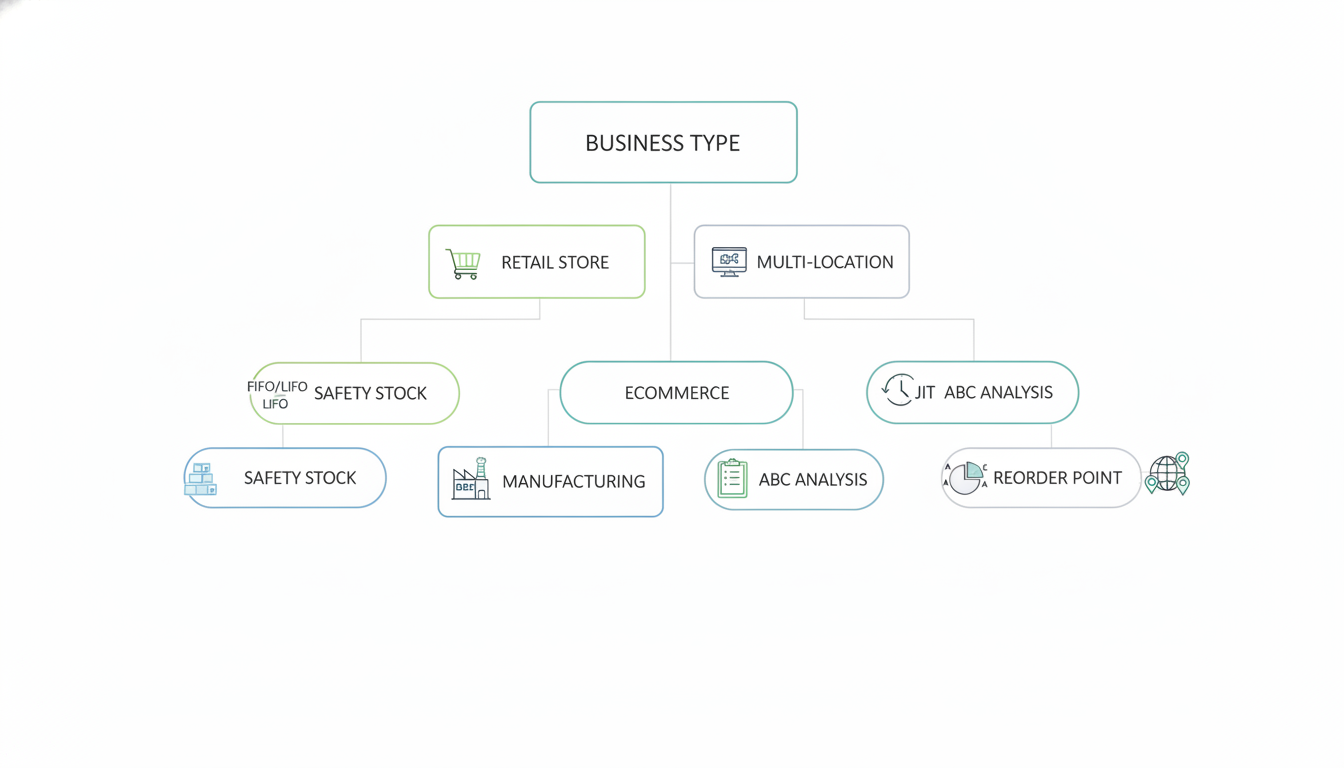
Match methods to your business model
That said, the best setup is usually a mix. Most teams use ABC analysis to decide where to spend attention, then use reorder points and safety stock to run replenishment for A items.
Retail (single location)
Start with FIFO discipline for dated/seasonal goods
Use ROP for A items you sell daily (review at least weekly)
Keep safety stock only on items that cause lost foot traffic when out of stock
Ecommerce (pick-pack-ship)
Use ABC based on units shipped and contribution margin
Use ROP with safety stock for “fast movers” that drive 60 to 80% of orders
JIT fits made-to-order or dropship lines, but only if supplier performance is consistent
Manufacturing (raw materials, WIP, finished goods)
Use ROP on critical components with long lead times (for example 30 to 90 days)
Use safety stock for parts that can stop production, even if units are cheap
JIT can work for non-critical inputs when suppliers are nearby and stable
Multi-location operations (stores, DCs, field warehouses)
Use ABC by location, not just company-wide, because “A” in one store can be “C” in another
Set different ROPs per location based on local demand and replenishment time
Common mistake: one shared min-max rule that creates transfers and emergency shipments
In practice, aim for a simple rule that a new buyer can follow on day one. If your method needs daily manual spreadsheet fixes to stay accurate, it is too fragile for real operations.
The metrics that expose waste and protect cash
Next, if you only look at total inventory value, you miss the real problem: where cash is stuck and where sales are leaking. A simple scorecard of a few metrics can show you exactly which SKUs are slow, which items are causing late shipments, and where loss is happening.
If you do one thing, do this: review exceptions every week, not every month. A 30-minute weekly check catches problems while you can still reorder, transfer stock, or pause purchasing before money gets trapped on the shelf.
Track these essentials and tie each one to an action:
Inventory turnover: how many times you sell through average stock in a period; works best for spotting slow movers, fails when demand is highly seasonal unless you compare to the same season last year
Days on hand (DOH): how long current stock will last at the current sales rate; prioritize this for cash protection because it flags overbuying early
Fill rate: percent of order lines shipped in full on time; if this drops, customers feel it before your finance reports do
Stockout rate: how often a SKU is unavailable when needed; common mistake is blaming forecasting when the real issue is late supplier lead times or incorrect reorder points
Carrying cost: the cost to hold inventory (space, insurance, obsolescence, capital); if you are short on time, approximate it as a simple percent and refine later
Shrinkage: losses from damage, theft, mispicks, or supplier issues; a spike often points to a process breakdown in receiving or cycle counts
Set targets and a review cadence so the numbers lead to decisions instead of dashboards.
Weekly (exceptions): top 10 SKUs by low DOH, top 10 by high DOH, any items with stockouts, any suppliers with missed lead times
Monthly (trends): turnover and DOH by category (for example: fasteners vs. electronics), fill rate by channel (B2B bulk vs. ecom), shrinkage pattern by location
Quarterly (policy reset): update reorder points and safety stock rules, retire dead stock criteria, and adjust service level targets based on margin and customer impact
A practical setup roadmap you can implement this month
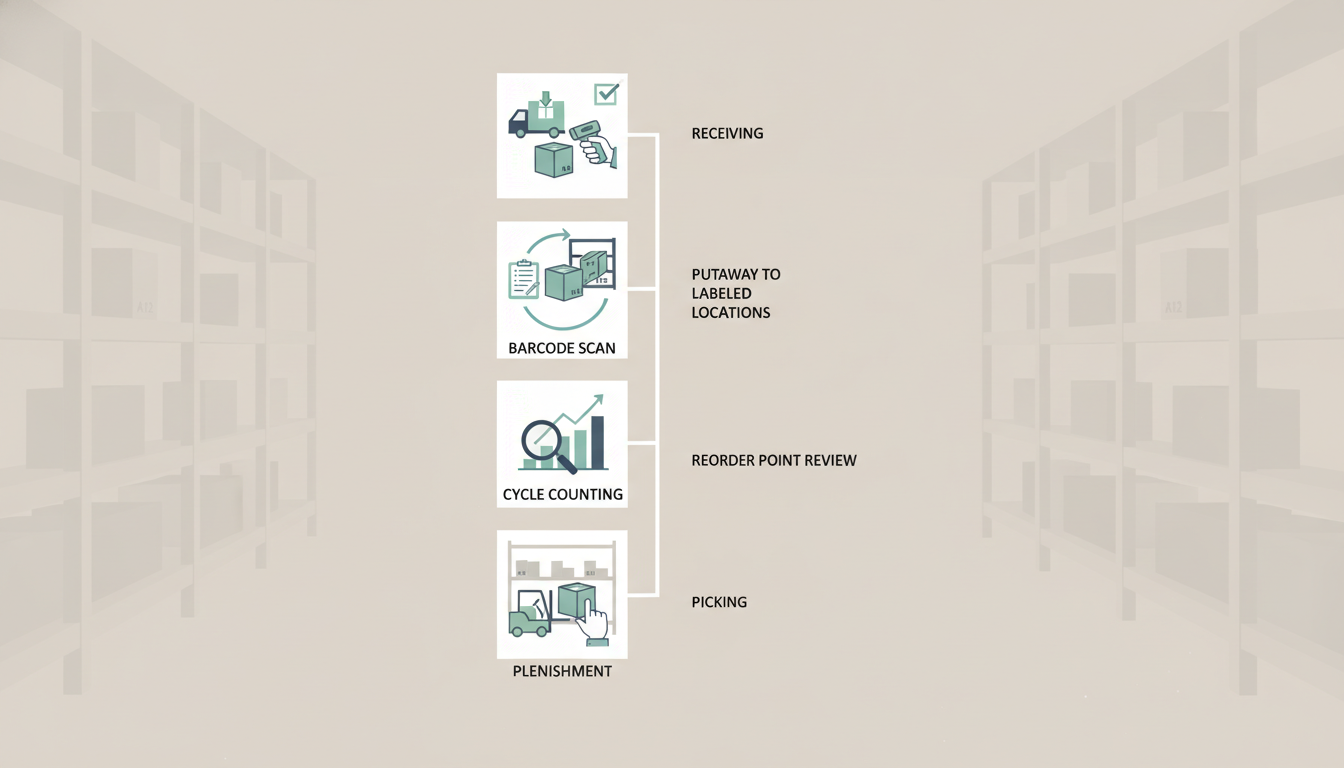
Next, you need a setup plan that turns inventory ideas into repeatable work across receiving, picking, and replenishment.
If you do one thing first, make every item and every location unambiguous. Most inventory problems are really naming problems, and they show up later as mis-picks, hidden stock, and endless adjustments.
Week 1: Standardize what you sell and where it lives
Start by making your SKUs and locations consistent, then lock them in so people stop inventing new names on the fly. For a small warehouse, plan on a few focused sessions of 60 to 90 minutes with the person who knows the catalog and the person who knows the floor.
Common mistake: cleaning data in the system but not matching labels on shelves and bins. Fix it by printing location labels and applying them the same day you rename locations in your system.
Checklist:
Pick one SKU format (example: BRAND-CATEGORY-SIZE-COLOR) and apply it to new items
Merge duplicates (example: “Tee BLK M” vs “Tshirt Black Medium”) and choose a single primary SKU
Set up a simple location scheme (example: Aisle 01, Bay B, Shelf 3, Bin 2)
Label locations where product is actually stored, including overstock and returns areas
Week 2: Clean locations and confirm on-hand counts
Also, clean up locations before you count, or your numbers will be wrong before you start. Clear one zone at a time so normal shipping can continue, and record exceptions (damaged, returns, unmarked product) in a separate holding location.
Here’s the catch: a full physical count can be too disruptive. If you are short on time, skip counting every item and do cycle counts on your top sellers first, then expand to the rest of the catalog over the next few weeks.
Steps:
Move unknown items to a single “Research” location
Cycle count 20 to 50 SKUs per day (start with A items or top 20 percent by sales)
Reconcile differences the same day while the context is fresh
Capture root causes for big variances (mislabel, unscanned receipt, wrong location)
Week 3: Set reorder points and build simple alerts
So, once counts are credible, set reorder points so purchasing is triggered by data, not panic. Works best when lead time and demand are fairly stable; it fails when demand is lumpy or supplier lead times swing, so review those items more often.
Keep it simple at first:
Set a reorder point for each priority SKU (demand during lead time plus a small buffer)
Add a reorder quantity that matches your typical supplier pack sizes
Turn on low-stock alerts for only your top movers to avoid alert fatigue
Assign an owner for each alert (buyer, warehouse lead, store manager)
Week 4: Define receiving and picking SOPs that people will follow
That said, reorder points will not hold if the daily work is inconsistent. Write short SOPs (standard operating procedures, meaning the exact steps a person follows every time) and test them with the people doing the job.
Two quick SOPs to start with:
Receiving SOP: scan or enter the PO, count cartons, scan items, print and apply labels, put away to named locations, close the receipt
Picking SOP: pick path by zone, scan item and location, confirm quantities, handle substitutions through a clear exception step
Tradeoff: scanning adds a few seconds per line, but it cuts mis-picks and “missing” inventory later. If accuracy is your biggest pain point, prioritize scanning on receiving first, then add scanning to picking.
Choose tools and integrations that match your complexity
In practice, choose tools based on where errors enter your flow. A small retailer shipping 30 orders per day may only need barcode scanning and a clean POS sync, while a 3PL or multi-warehouse brand will need deeper permissions and automation.
Starter tool checklist:
Barcode scanning (mobile app or dedicated scanners) for receiving and picking
POS or ERP sync so sales and receipts update inventory automatically
Role-based permissions so not everyone can edit counts, locations, or SKUs
Alerts for low stock, negative inventory, and items sitting in “Research” too long
Basic integration map: what system is the source of truth for SKUs, costs, and locations
Closing remarks
So, remember this line when your stock reports start to feel noisy: What gets counted gets controlled. You do not need a perfect system to make progress, but you do need a consistent way to measure what is actually happening on the shelf and in the software.
If you do one thing this week, pick a single change that reduces errors at the source, then stick with it for 5 business days and review what changed:
Cleaner SKUs if you see duplicate items, inconsistent names, or frequent picking mistakes
Cycle counts if your on hand numbers are often wrong, especially for fast movers
Reorder points if you keep running out or tying up cash in slow stock
Choose one, assign an owner, and set a simple success check, like fewer stockouts, fewer adjustments, or a shorter time spent investigating misses. That one change will make next month’s improvements easier to spot and repeat.
Director Development
Courses
-
Boardroom Excellence
-
Corporate Accountability
-
Financial Acumen
-
Digital Transformation
-
Director’s Toolkit
-
Global Business Strategies
-
Legal Insights for Directors
-
Managing Crisis
-
Mergers and Acquisitions
-
Risk Management Strategies
-
Stakeholder Engagement
-
Sustainability and ESG
-
The Modern Director
Executive Education
Categories
-
Advanced People and Culture
-
Corporate Governance Ethics
-
Customer-Centric Strategies
-
Digital Transformation
-
Financial Acumen for Leaders
-
Global Business Strategy
-
Innovation and Change
-
Sales and Marketing
-
Strategic Leadership and Vision
-
Sustainability and CSR
Executive Education
Courses
-
Accountability Transparency
-
Advanced CRM and AI
-
Advanced Financial Strategy
-
Advanced Strategic Planning
-
Blockchain and Emerging Tech
-
Boardroom Dynamics
-
Brand Leadership
-
Building Data-Driven Sales
-
Building Executive Resilience
-
Corporate Gov Excellence
-
Corporate Social Responsibility
-
Cross-Border Mergers
-
Cybersecurity Strategy
-
Data-Driven Decision Making
-
Design Thinking for Executives
-
Developing Global Expansion
-
Driving Growth
-
Driving Service Excellence
Executive Education
Courses
-
Advanced Communication
-
Business Continuity
-
Diversity and Inclusion
-
Service Excellence
-
Data-Driven Decisions
-
Corporate Social Responsibility
-
Planning and Budgeting
-
Design Thinking
-
Product Development
-
Visionary Leadership
-
Corporate Governance
-
Process
-
Performance
-
Risk
-
Sales Strategy
-
Environmental Impact
-
Emerging Technologies
-
Work Life Balance
-
View More
Management
Categories
-
Communication
-
Crisis and Risk
-
Cultural Competency
-
Customer-Centric
-
Digital Transformation
-
Ethical and Sustainable
-
Financial
-
Innovation Change
-
Innovation Entrepreneurship
-
Leadership and Strategic
-
Legal and Compliance
-
Operational
-
People
-
Project
-
Sales and Marketing
-
Sustainability and Enviro
-
Technology and Cybersecurity
-
Time and Stress
Management Courses
-
Coming Soon
Diploma Courses
-
Coming Soon
Industry Qualification Categories
-
Coming Soon
Industry Qualification Courses
-
Coming Soon
Trade & Vocational
Categories
-
Business & Finance
-
Creative Arts & Design
-
Education & Training
-
Environ & Agri Tech
-
Fashion & Textile
-
Healthcare & Medical
-
Hospitality & Service
-
Law & Security
-
Manufacturing & Engineering
-
Miscellaneous
-
Personal Dev & Wellness
-
Technology and IT
-
Trades and Construction
-
Transport & Logistics
Trade & Vocational
Courses
-
3D Game Development
-
3D Modeling and Animation
-
3D Printing and Additive
-
Aerospace Technician
-
Air Conditioning Repair
-
Aircraft Avionics Systems
-
Aircraft Maintenance
-
App Development
-
Apparel Manufacturing
-
Auto Body Repair
-
Automated Systems Technician
-
Automotive Repair
-
Baking and Pastry Arts
-
Barista and Coffee Brewing
-
Bicycle Repair
-
Biomedical Equipment
-
Biotechnology Laboratory
-
Blockchain Development
Trade & Vocational Courses
-
Broadcasting and Journalism
-
Building Maintenance
-
Business Intelligence and Data
-
Business Process Outsourcing
-
Computer Numerical Control
-
Carpentry and Woodworking
-
Child Care and Early Education
-
Cloud Computing
-
Commercial Driver’s License
-
Commercial Photography
-
Commercial Refrigeration
-
Computer Programming
-
Construction Project
-
Corporate Training
-
Cosmetology and Skincare
-
Culinary Arts and Cuisine
-
Cybersecurity Fundamentals
-
Cybersecurity Risk
-
Cybersecurity Law Enforce
Trade & Vocational Courses
-
Data Analysis Visualization
-
Data Science Machine Learning
-
Database Administration
-
Dental Assistant and Hygiene
-
Digital Forensics
-
Digital Illustration Concept Art
-
Digital Marketing SEO
-
Digital Photography Editing
-
Drone Maintenance
-
E-commerce Development
-
Educational Technology
-
Elderly Care Geriatric
-
Electrical Installation
-
Electrocardiogram Technician
-
Electronics Repair
-
Emergency Medical Technician
-
Environmental Health Safety
-
Event Planning
-
Event Videography
Trade & Vocational Courses
-
Fashion Design Tailoring
-
Fashion Merchandising
-
Film Production
-
Fire Safety Prevention
-
Firefighting Response
-
Fitness Trainer Coaching
-
Food Safety Sanitation
-
Forklift Operation
-
Furniture Restoration
-
Game Design (UX)
-
Geographic Info Systems
-
Graphic Design Com
-
HVAC Technician
-
Heavy Equipment
-
Home Inspection Codes
-
Hospitality Service
-
Hotel Front Desk
-
Human Resources Dev
-
Human Resources Manage
Trade & Vocational
Courses
-
IT Network Security
-
IT Support Technician
-
Industrial Technician
-
Industrial Machine Operations
-
Interior Design Planning
-
Interior Lighting Design
-
Landscape Architecture Design
-
Landscape Irrigation Systems
-
Law Enforce Criminal Justice
-
Leadership Skills Training
-
Luxury Goods Sales Marketing
-
Machine Learning for Business
-
Marine Biology Technician
-
Masonry and Concrete Work
-
Massage Therapy Bodywork
-
Medical Laboratory Technician
-
Mobile App Development
-
Music Production Composition
-
Network Cable Installation
-
Nursing Assistant Training
-
Painting Decorating
Trade & Vocational Courses
-
Personal Assistant Support
-
Personal Development
-
Personal Financial Planning
-
Pharmacy Technician
-
Physical Therapy Assistant
-
Piping and Pipeline Systems
-
Plastering Drywall Installation
-
Plumbing Systems
-
Precision Agriculture Farming
-
Precision Machining
-
Project Estimating and Costing
-
Property Management
-
Public Health and Wellness
-
Public Relations Com
-
Public Safety Management
-
Quality Assurance Control
-
Renewable Energy Systems
-
Risk Management Compliance
-
Robotics Welding
-
Robotics Automation Systems
-
Roofing Waterproofing
Trade & Vocational Courses
-
Sculpture Fine Art Techniques
-
Security Systems Installation
-
Sewing Garment Construction
-
Smart Automation Systems
-
Smart Grid Renewable Energy
-
Smart Home Technology
-
Social Media Management
-
Solar Panel Installation
-
Sound Engineering Mixing
-
Sports Coaching
-
Sports and Fitness Nutrition
-
Structural Engineering Drafting
-
Supply Chain Logistics
-
Sustainable Construction
-
Tattoo Art and Body Piercing
-
Technical Writing Documents
-
Telecommunications Networking
-
Textile and Fabric Technology
-
Travel Agency Operations
-
Travel Tourism Management
-
Urban Farming Aquaponics
Trade & Vocational
Categories
-
Business & Finance
-
Creative Arts & Design
-
Education & Training
-
Environ & Agri Tech
-
Fashion & Textile
-
Healthcare & Medical
-
Hospitality & Service
-
Law & Security
-
Manufacturing & Engineering
-
Miscellaneous
-
Personal Dev & Wellness
-
Technology and IT
-
Trades and Construction
-
Transport & Logistics
Career Pathways
-
Accountant
-
Computer Programmer
-
Data Scientist
-
Teacher
-
Engineer
-
HSE Officer
-
Hotel Manager
-
Human Resource Manager
-
Info Tech Manager
-
Lawyer
-
Executive Officer
-
Marketing Manager
-
Nurse
Career Pathways
-
Coming Soon
Career Pathways
-
Coming Soon
Career Levels
-
Director Development
-
Executive Education
-
Management
-
Diploma
-
Industry Qualifications
-
Trade & Vocational
-
Career Pathways
-
Soft Skills
-
Free Online Courses
Course Disciplines
-
Accounting & Finance
-
Agriculture & Environment
-
Aviation & Transportation
-
Communication & PR
-
Computer Science
-
Creative Arts & Media
-
Data Science
-
Education & Teaching
-
Emerging Technology
-
Engineering
-
Health Safety & Environment
-
Health & Wellness
-
Hospitality
-
Human Resources
-
Information Technology
-
Languages
-
Legal & Regulatory
-
Marketing & Sales
-
Medical
-
Performing Arts & Theatre
-
Security
-
Social Sciences
-
Sports
Soft Skills
-
Business Management
-
Coding and Software
-
Creative Design Pro
-
Digital Marketing
-
Entrepreneurship and Start-up
-
Financial Management
-
Hotel Management
-
IT and Cybersecurity
-
Microsoft Office
-
Project Management
-
Soft Skills
Partners
-
Learning Centres
-
Academic Partners
-
Corporate Partners
-
NGO Partners
-
Professional Associations
-
AION for Business
Regions
-
Africa
-
Asia
-
Caribbean
-
Central America
-
Europe
-
Middle East
-
North America
-
Oceania
-
South America
Our Vision is to Deliver Global Affordable Quality Education and to Solve the United Nations Sustainable Development Goal #4
Our Mission is to Empower Individuals with the Skills they need to Follow any Career Path they seek.
Our Strategy entails a Flexible Education Model, Practical Skills & Global Qualifications, Our Students are Positioned for Jobs, Entrepreneurship, Career Changes & Competence in the Real World.
AION Academy
-
Home
-
About
-
Blog
-
News
-
Work With Us
-
Affiliate Programme
-
Full Course List
Connect
-
Contact Us
-
Sign In
-
Sign Up
-
Reset Password
-
Idea Hub
-
Create Your Course
-
Merchandise Store
-
Media Kit
-
Web Links
Legal
-
Terms of Service
-
Privacy Policy
-
Cookie Policy
-
Honour Code
-
Accessibility Policy
-
Trademark Policy
-
Modern Slavery Statement
-
Your Privacy Choices
-
Sitemap